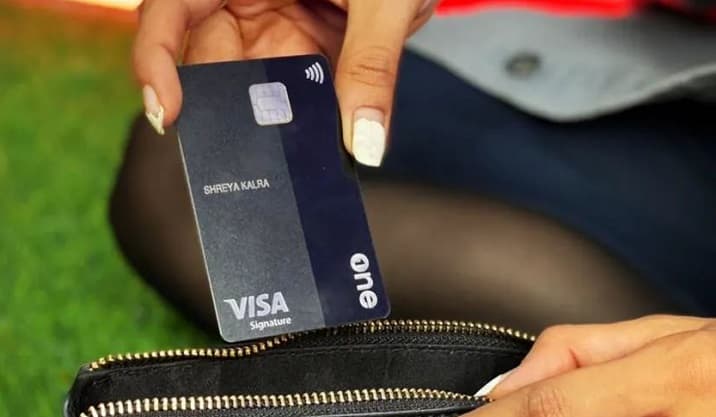
OneCard users report app crashes, payment failures, and auto-exit errors after update
Consumer desk — Play Store review pattern, support gap, and why fintech uptime is trust.
Google Play reviews for OneCard: Credit Card & UPI describe post-update crashes, failed repayments, and auto-logout — users say cache clear and reinstall did not fix access before due dates.
OneCard users report app crashes, payment failures, and auto-exit errors after update — Consumer, Chennai local news
App
OneCard: Credit Card & UPI
Platform
Google Play Store (Android)
Reported issues
Crashes after update, auto-exit, login failure, repayment failure
User fixes tried
Cache clear, reinstall, tickets, email/WhatsApp support
Example device cited
Redmi Note 14 Pro Plus
Overall Play rating (visible)
Around 4.4 — strong historically, but recent reviews flag live pain
Source
Public Play Store review thread
What we know
Why this matters beyond a normal app bug
A financial app is not judged only by design, rewards, or card features. It is judged when a user needs to check a bill, verify a due date, repay an amount, or access account details under pressure.
Recent user reviews visible on the Google Play Store for OneCard: Credit Card & UPI show a worrying pattern. Multiple users report that the app keeps crashing after updates, refuses to open, logs them out automatically, shows repeated error messages, and even blocks repayment attempts.
For a casual utility app, this would be irritating. For a credit card and payment app, it becomes serious.
The main complaint: crashes after the new update
Several users are not merely saying the app is slow or buggy. They are saying the app is unusable.
Repeated phrases across reviews include:
- “After your new update, the app keeps crashing.”
- “I am not able to open the app.”
- “Auto-exit issue persists.”
- “I cannot use the new updated app after the auto update.”
- “The repayment option is not working.”
This indicates the issue may not be isolated to one user, one device, or one installation error. The pattern suggests a larger app stability problem affecting multiple users across different dates.
Users have already tried the usual fixes
The reviews show many users already attempted standard troubleshooting:
- clearing cache
- clearing app data
- uninstalling and reinstalling the app
- retrying after some time
- sending emails and raising tickets
- sharing screenshots or videos
- contacting support through calls, WhatsApp, or email
One user specifically mentions using a Redmi Note 14 Pro Plus and says the issue persisted even after clearing cache, cookies, and reinstalling the app multiple times.
When users repeatedly say those steps have already failed, continuing to send the same generic response becomes a customer experience failure.
What users say they cannot do
| Blocked action | Why it matters |
|---|---|
| Check statements | Cannot verify spending or disputes |
| View credit card due details | Due-date pressure without visibility |
| Pay bills / repay | Direct path to late fees |
| Access repayment options | Core fintech utility broken |
| Verify account status | Trust and planning collapse |
One review says the user’s due date was near and the repayment option kept failing. Another user says they could not even know the card amount due because the app was crashing.
A crash in a shopping app delays a purchase. A crash in a financial app can create penalties, anxiety, credit score concerns, and customer distrust.
“I just need access” — not new features
From the user’s side, the frustration is understandable. They are not asking for luxury features or a new reward program. They are asking for the basic ability to open the app, check dues, and make payments.
One user even says the older app was better and suggests rolling back to the previous version until bugs are fixed. When users prefer an older version, the update has failed its most basic test: continuity.
Support replies: polite, but not deep enough
Company responses shown in review threads are polite — they apologise, acknowledge inconvenience, and ask users to share issue details or screenshots.
But the replies also appear repetitive and generic:
- “We’re sorry for the experience you’ve had.”
- “Please send the issue details and screenshots.”
- “Our team is working on this.”
- “Further updates will be provided via email under ticket…”
The problem is not politeness. The problem is depth.
When multiple reviews repeat the same crash pattern, users need to know whether:
- the bug has been identified
- affected devices or Android versions are known
- a hotfix is coming
- users can temporarily use another repayment route
- late fees caused by app failure will be handled
- support can manually assist repayment
Without that clarity, the public response feels procedural rather than problem-solving.
Sources
- Primary: OneCard: Credit Card & UPI — Google Play
- Context: User review patterns described in this report reflect publicly visible Play Store posts; OneCard has not issued a detailed public incident note at the time of writing.
What this means in Chennai
Local impact, institutions, and what residents should watch next.
Why Chennai readers should care
OneCard is widely used among young professionals and card-first spenders in Chennai, Bengaluru, and other metros — including users on Xiaomi/Redmi, Samsung, and OnePlus devices common in Tamil Nadu’s Android market.
India’s fragmented Android ecosystem means an update that passes QA on clean flagship devices can still fail on:
- mid-range phones with aggressive battery optimisation
- MIUI/HyperOS background kill rules (relevant to Redmi models cited in reviews)
- upgrade paths where old app data conflicts with new session or payment modules
If you cannot open the app before a credit card due date, the issue is not “IT frustration” — it is consumer protection and credit hygiene.
What a production incident response should look like
Based on visible review patterns, this should be treated like a production incident, not ordinary app feedback.
Engineering and QA should investigate:
- crash logs after the latest update
- affected Android versions and phone models
- login/session handling and auto-logout
- payment module failures and “something went wrong” server errors
- app launch failure after in-place update vs fresh install
- whether cached user data conflicts with new app logic
Release testing for Indian fintech must cover real upgrade paths on popular mid-range devices — not only clean emulators.
What users need immediately (public answers)
| Question | What users expect |
|---|---|
| How do I pay if the app will not open? | Official alternate repayment channel published |
| Will late charges be reversed? | Clear policy if outage caused delay |
| Is there a known bug in the latest version? | Transparent status page or Play Store developer note |
| Which version contains the fix? | Version number + rollout timeline |
| Should I avoid updating? | Temporary guidance until hotfix ships |
These answers should be public, not hidden inside individual email tickets.
SEO context
Searches around OneCard app crashing after update, OneCard payment failed error, OneCard auto-exit issue, and OneCard app not opening reflect how quickly a fintech bug becomes a trust issue.
Users are worried about bill payments, due dates, penalties, and lack of direct support — not just inconvenience.
Final view
The OneCard story is not only an app crash headline. It is a reminder that fintech apps carry heavier responsibility than ordinary consumer apps. When access breaks, user trust breaks with it.
A financial app must remain reliable when users urgently need to pay, verify, or protect themselves from penalties.
Soundbite: In fintech, uptime is not a feature. It is trust.
Related reading on mychennaicity.in
- Consumer topic — apps, bills, and consumer desk updates.
- Chennai local news — latest city and consumer stories.
Official sources
This page is an editorial rephrase and analysis based on publicly reported information. Read the original source for full context.
FAQ
Visible reviews cite app crashes after updates, inability to open the app, auto-exit, login failures, and repayment options not working — often after users already cleared cache or reinstalled.
Explore the site
More from mychennaicity.in
Chennai today, local news, jobs, events, gold rate, and a moderated WhatsApp community — one city desk.
- Chennai today60-second morning card
- WhatsApp communityModerated Chennai updates
- Chennai local newsCivic desk & neighbourhood stories
- Afford this areaTake-home vs rent check
- Jobs in ChennaiOpen roles across the city
- Which Chennai are you?Playful neighbourhood quiz
New here? How to use mychennaicity.in — guides for residents, job seekers, admins, and more.
Promote your business to Chennai readers
Get visibility across local news, events, jobs and area pages.
Reader group: The my chennai city reader group — short updates and civil discussion, same standards as the site. Opens WhatsApp after you tap.
Tip the Chennai desk
Spotted something we should look at — safety, civic works, consumer rip-offs, or a human story? A short message is enough; links and dates help.